

Key Things to Know
PeopleSoft FSCM Update Image 55 introduces a set of enhancements focused on usability, insight, and maintainability. For organizations working with a PeopleSoft partner to plan update strategies, this image continues Oracle’s shift toward modern user experiences, actionable analytics, and tools that help teams manage change more effectively over time.
Below are the most important updates to understand and why they matter.
New Sectionalized Landing Page Experience
FSCM Image 55 delivers a modern, sectionalized landing page that serves as a unified entry point for users across roles, including employees, managers, and functional analysts. Instead of relying on traditional homepages or navigation-heavy workflows, users are guided to relevant tasks, unfinished work, and timely messages directly from the landing page.

FSCM Image 55 new Landing Page
Built on PeopleTools 8.62 styling capabilities, organizations have full control over the look and feel of the page using delivered tools. This includes background textures, section layouts, tile styles, and visual hierarchy, all without customization. Sections can be copied and adapted to fit business needs while still relying on standard PeopleTools functionality.
The result is a more intuitive starting point that reduces navigation time and helps users focus on high-value work.
Notification Publisher for Targeted, In-App Communication
Image 55 introduces Notification Publisher, extending PeopleSoft’s Notification Composer framework to support organizational announcements directly within the application.
Notifications can now be published via email, text message, or in-app delivery and displayed on specific landing page sections such as banners or announcements. Administrators can:
- Schedule notifications for immediate or future delivery
- Set expiration dates or recurring schedules
- Target specific roles, users, or groups
- Include links, attachments, or additional resources

FSCM Image 55 new Notification Publisher
This provides a centralized, consistent way to communicate system outages, policy changes, or departmental updates without relying on external tools or inbox-heavy messaging.
Customization Insights for Smarter Maintenance Decisions
Customization Insights is one of the most impactful additions in FSCM Image 55, particularly for organizations working with a PeopleSoft partner to reduce long-term maintenance risk and improve upgrade readiness.
This dashboard combines customization data with PUM metadata to show:
- Which customizations exist and where they are used
- Which have been impacted by prior update images
- Which customizations are unused or lightly used
- Which product areas require the most ongoing maintenance
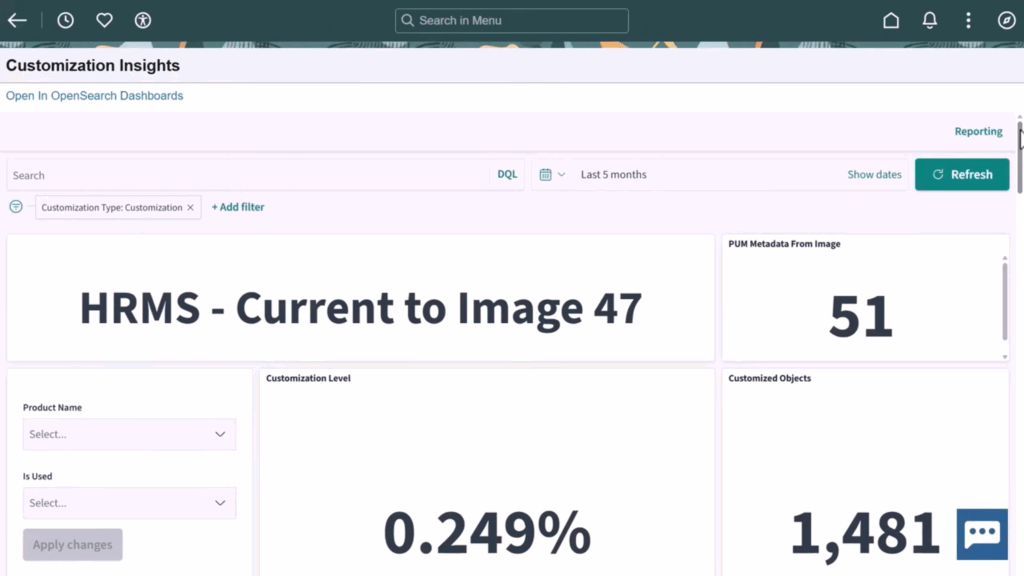
FSCM Image 55 Customization Insights Dashboard
When Usage Monitor is enabled, insights become more meaningful over time, helping teams identify candidates for retirement or refactoring. The dashboard also shows how often customizations are impacted by delivered updates, allowing teams to prioritize cleanup efforts based on real maintenance cost, not assumptions.
To enable Customization Insights, organizations must be on PeopleTools 8.62 and apply the required FSCM Image 55 patches, then run the delivered Change Assistant wizard to populate data.
Interactive Insights Embedded in WorkCenters
Image 55 continues Oracle’s expansion of Interactive Insights, starting with General Ledger.
Within GL WorkCenters, users can now view interactive visualizations directly in the “My Work” section. One example is the Journals Ready for Post insight, which highlights valid journals that may have missed batch posting. Users can interact with the visualization, drill into journal details, and take action without leaving the WorkCenter.

FSCM Image 55 new GL WorkCenters Interactive Visualizations
This approach brings analytics closer to day-to-day processing and reduces the need to navigate between dashboards and transactional pages.
Procurement, Inventory, and Travel Enhancements
Several functional areas received targeted updates aimed at improving visibility and control.
Procurement Card Approvals
The Reconcile Procurement Card Statement page now supports configurable approval workflows. Users can submit transactions, track approval status, and approve PCard activity directly from the Pending Approvals page, including access to header-level details.

FSCM Image 55 Configurable Approval Workflows
Inventory Par Replenishment Insights
New dashboards for Par Location and Par Location Activity provide better visibility into par counts, item distribution, replenishment activity, and zero-stock scenarios across business units. These insights help inventory teams manage replenishment more proactively and efficiently.

FSCM Image 55 Par Location and Par Location Activity dashboards
Proxy Insights for Travel Authorizations
The My Proxy Expense Activity dashboard consolidates expense and travel data for users who submit or approve on behalf of others. Filters allow users to analyze policy violations, approval status, corporate card spend, and denied travel authorizations, all within a single, interactive view.

FSCM Image 55 My Proxy Expense Activity Dashboard
Additional FSCM Enhancements Worth Noting
Image 55 also includes a number of incremental but valuable updates across FSCM modules, including:
- Page and Field Configurator enhancements with real-time indexing for change tracking insights
- General Ledger support for expanded journal comments, long descriptions, and reference fields
- Improved nVision drill-down layouts and close ledger roll-forward options
- Billing validation enhancements during interface processing
- Receivables updates for attachments, Excel uploads, and regional reporting
- Treasury support for ISO 20022 bank statement formats
- Supplier Contract Management notifications for DocuSign workflows
- Maintenance Management enhancements for copying work orders across business units
- Asset Management support for printing location codes as QR codes or barcodes
These updates collectively improve usability, reporting flexibility, and operational efficiency across FSCM.
FSCM Image 55 Overall
From a PeopleSoft partner perspective, FSCM Image 55 refines how users interact with the system, how organizations manage change, and how teams gain insight into their data and customizations.
For organizations on PeopleTools 8.62, this image provides meaningful opportunities to modernize user experience, reduce customization risk, and embed analytics into everyday work, all while staying within delivered PeopleSoft capabilities.
If you have questions about FSCM Image 55, PeopleTools 8.62 readiness, or how these features fit into your broader PeopleSoft roadmap, Elire is here to help as your PeopleSoft partner. Contact PeopleSoft@elire.com to connect with our team and follow Elire on LinkedIn for ongoing PeopleSoft updates and insights.